
【6日でできるPHP入門】CSSでアプリの見栄えを良くする
Webアプリの印象や使いやすさは「見た目(デザイン)」が大きく左右します。PHPで作成した「社員情報管理アプリ」も、CSSを活用して見栄えを整えることで、より快適で分かりやすい画面に進化させることができます。
ここでは、「アプリを作成する」で作成した「社員情報管理アプリ」CSSを外部ファイル(style.css)として管理し、アプリ全体に一括で適用する方法と、ファイルの配置例・各PHPプログラムの書き方を解説します。

1.ディレクトリ構成
会社情報管理アプリ(company_app2)の標準的な構成例を示します。
company_app2/
├── index.php
├── employee_input.php
├── employee_edit.php
├── employee_update.php
├── employee_delete.php
├── post_data.php
├── common.php
├── css/
│   └── style.css           ← 追加するCSSファイル
└── common/
    ├── html_functions.php
    ├── dbmanager.php
└── data_check.phpcss/style.cssに全体のデザインルールをまとめます。- 各PHPファイルは
company_app2/直下またはcommon/内に配置します。
2.外部CSSファイルの作成と適用
2.1. style.cssの内容例
ファイル名: company_app2/css/style.css
(自分で好きなようにカスタマイズしてOKです)
body {
    font-family: 'Segoe UI', 'Meiryo', sans-serif;
    background: #f4f6f8;
    color: #222;
    margin: 0;
    padding: 0;
}
h1 {
    background: #347fc4;
    color: #fff;
    margin: 0 0 1em 0;
    padding: 1em 1.5em;
    font-size: 1.7em;
}
table {
    width: 90%;
    margin: 2em auto 2em auto;
    border-collapse: collapse;
    background: #fff;
    box-shadow: 0 2px 8px #ddd;
}
th, td {
    border: 1px solid #b2b2b2;
    padding: 0.7em 1.2em;
    text-align: center;
    font-size: 1em;
}
th {
    background: #347fc4;
    color: #fff;
}
tr:nth-child(even) {
    background: #f3f8fa;
}
tr:hover {
    background: #d0eaff;
}
input[type="text"], input[type="password"] {
    width: 75%;
    padding: 0.4em;
    margin-bottom: 0.8em;
    border: 1px solid #bbb;
    border-radius: 4px;
    font-size: 1em;
}
input[type="submit"], .btn {
    background: #347fc4;
    color: #fff;
    border: none;
    padding: 0.5em 1.8em;
    border-radius: 4px;
    font-size: 1em;
    cursor: pointer;
    transition: background 0.2s;
    margin: 0.6em 0.2em 0.6em 0;
    text-decoration: none;
    margin-left: 36px;
    display: inline-block;
}
input[type="submit"]:hover, .btn:hover {
    background: #265c91;
}
.btn-add {
    background: #44b86b;
}
.btn-add:hover {
    background: #369158;
}
form {
    max-width: 520px;
    margin: 2em auto;
    background: #fff;
    border-radius: 8px;
    box-shadow: 0 1px 8px #bbb;
    padding: 2em;
}
form p {
    margin: 1em 0 0.2em 0;
    font-size: 1em;
}
p[style*="color:red"] {
    margin: 0.5em 0 0.5em 0;
    font-weight: bold;
}
a {
    color: #347fc4;
}
a.btn, a.btn-add {
    color: #fff !important;
}
2.2. PHPからCSSを読み込む
全ページの<head>で
<link rel="stylesheet" href="css/style.css">
を読み込むことで、外部CSSが全ページに適用されます。
本アプリでは
common/html_functions.phpのshow_top()関数内でCSSを読み込むことで一括適用します。
3.各プログラム例(省略なし・最新版)
3.1. index.php
<?php
require_once("common.php");
show_top("社員一覧");

// 全社員の情報を取得
$members = $dbm->get_all_employees();
if ($members != null) {
    show_employee_list($members);
}
echo '<a href="employee_input.php" class="btn btn-add">新しい社員の登録</a>';

show_bottom();
?>
3.2. common.php
<?php
require_once("common/html_functions.php");
require_once("common/dbmanager.php");
require_once("common/data_check.php");

// エラー取得関数
function get_error() {
    $error = "";
    if (isset($_GET["error"])) {
        $error = $_GET["error"];
    }
    return $error;
}

// DBManagerのインスタンスを生成
$dbm = new DBManager();
?>
3.3. employee_input.php
<?php
require_once("common.php");

$id = $_GET["id"] ?? "";
$name = $_GET["name"] ?? "";
$department = $_GET["department"] ?? "";
$position = $_GET["position"] ?? "";

show_top("社員情報の追加");
show_employee_input($id, $name, $department, $position);
show_bottom(true);
?>
3.4. employee_edit.php
<?php
require_once("common.php");
$id = $_GET["id"];
$employee = $dbm->get_employee($id);

show_top("社員情報の選択");

show_employee($employee);
show_employee_operations($id);

show_bottom(true);
?>
3.5. employee_update.php
<?php
require_once("common.php");
$old_id = $_GET["id"];
$employee = $dbm->get_employee($old_id);

$id = $employee["id"];
$name = $employee["name"];
$department = $employee["department"];
$position = $employee["position"];

show_top("社員情報の編集");
show_employee_update($id, $name, $department, $position, $old_id);
show_bottom(true);
?>
3.6. employee_delete.php
<?php
require_once("common.php");
$id = $_GET["id"];
$employee = $dbm->get_employee($id);

show_top("社員情報の削除");
show_employee_delete($employee);
show_bottom(true);
?>
3.7. post_data.php
<?php
require_once("common.php");

if (isset($_POST["action"])) {
    // 入力値の取得
    $id = $_POST["id"] ?? "";
    $name = $_POST["name"] ?? "";
    $department = $_POST["department"] ?? "";
    $position = $_POST["position"] ?? "";
    $old_id = $_POST["old_id"] ?? "";

    // 登録処理
    if ($_POST["action"] == "create") {
        if (!check_employee_input($id, $name, $department, $position, $error)) {
            header("Location: employee_input.php?error={$error}");
            exit();
        }
        if ($dbm->if_id_exists($id)) {
            $error = "すでに登録されている社員番号です。";
            header("Location: employee_input.php?error={$error}");
            exit();
        }
        if (!$dbm->insert_employee($id, $name, $department, $position)) {
            $error = "データベースエラーが発生しました。";
            header("Location: employee_input.php?error={$error}");
            exit();
        }
        header("Location: index.php");
        exit();

    // 更新処理
    } else if ($_POST["action"] == "update") {
        if (!check_employee_input($id, $name, $department, $position, $error)) {
            header("Location: employee_update.php?error={$error}&id={$old_id}");
            exit();
        }
        if ($dbm->if_id_exists($id) && $id != $old_id) {
            $error = "すでに登録されている社員番号です。";
            header("Location: employee_update.php?error={$error}&id={$old_id}");
            exit();
        }
        $dbm->update_employee($id, $name, $department, $position, $old_id);
        header("Location: index.php");
        exit();

    // 削除処理
    } else if ($_POST["action"] == "delete") {
        if (!$dbm->delete_employee($id)) {
            $error = "データベースエラーが発生しました。";
            header("Location: employee_delete.php?error={$error}&id={$id}");
            exit();
        }
        header("Location: index.php");
        exit();
    }
}
?>
3.8. common/html_functions.php
<?php
// HTMLヘッダー
function show_top($title = "社員管理") {
    echo <<<HEADER
<html>
<head>
<title>{$title}</title>
<meta charset="UTF-8">
<link rel="stylesheet" href="css/style.css">
</head>
<body>
<h1>{$title}</h1>
HEADER;
}

// HTMLフッター
function show_bottom($return_top = false) {
    if ($return_top) {
        echo '<a href="index.php" class="btn">社員一覧に戻る</a><br>';
    }
    echo <<<FOOTER
</body>
</html>
FOOTER;
}

// 社員一覧テーブル表示
function show_employee_list($members) {
    echo '<table>';
    echo '<tr><th>社員番号</th><th>名前</th><th>所属</th><th>役職</th></tr>';
    foreach ($members as $row) {
        echo "<tr>";
        echo "<td>{$row['id']}</td>";
        echo "<td><a href='employee_edit.php?id={$row['id']}'>{$row['name']}</a></td>";
        echo "<td>{$row['department']}</td>";
        echo "<td>{$row['position']}</td>";
        echo "</tr>";
    }
    echo '</table><br>';
}

// 新規登録フォーム
function show_employee_input() {
    $error = get_error();
    echo <<<FORM
<form action="post_data.php" method="post">
<p>社員番号<br><input type="text" name="id" placeholder="例:1001"></p>
<p>名前<br><input type="text" name="name" placeholder="例:佐藤一郎"></p>
<p>所属<br><input type="text" name="department" placeholder="例:営業部"></p>
<p>役職<br><input type="text" name="position" placeholder="例:課長"></p>
<p style="color:red;">{$error}</p>
<input type="hidden" name="action" value="create">
<input type="submit" value="登録" class="btn btn-add">
</form>
FORM;
}

// 編集フォーム
function show_employee_update($id, $name, $department, $position, $old_id) {
    $error = get_error();
    echo <<<FORM
<form action="post_data.php" method="post">
<p>社員番号<br><input type="text" name="id" value="{$id}"></p>
<p>名前<br><input type="text" name="name" value="{$name}"></p>
<p>所属<br><input type="text" name="department" value="{$department}"></p>
<p>役職<br><input type="text" name="position" value="{$position}"></p>
<p style="color:red;">{$error}</p>
<input type="hidden" name="old_id" value="{$old_id}">
<input type="hidden" name="action" value="update">
<input type="submit" value="更新" class="btn">
</form>
FORM;
}

// 削除フォーム
function show_employee_delete($employee) {
    $error = get_error();
    echo '<table>';
    echo '<tr><th>社員番号</th><th>名前</th><th>所属</th><th>役職</th></tr>';
    echo "<tr>";
    echo "<td>{$employee['id']}</td>";
    echo "<td>{$employee['name']}</td>";
    echo "<td>{$employee['department']}</td>";
    echo "<td>{$employee['position']}</td>";
    echo "</tr></table><br>";
    echo <<<FORM
<form action="post_data.php" method="post">
<p style="color:red;">{$error}</p>
<input type="hidden" name="id" value="{$employee['id']}">
<input type="hidden" name="action" value="delete">
<input type="submit" value="削除" class="btn">
</form>
FORM;
}

// 社員詳細
function show_employee($member) {
    if ($member === null) {
        echo "<p>該当する社員データがありません。</p>";
        return;
    }
    echo "<table>";
    echo "<tr><th>社員番号</th><th>名前</th><th>所属</th><th>役職</th></tr>";
    echo "<tr>";
    echo "<td>{$member['id']}</td>";
    echo "<td>{$member['name']}</td>";
    echo "<td>{$member['department']}</td>";
    echo "<td>{$member['position']}</td>";
    echo "</tr>";
    echo "</table><br>";
}

// 編集・削除操作
function show_employee_operations($id) {
    echo "<a href='employee_update.php?id={$id}' class='btn'>情報の編集</a>";
    echo "<a href='employee_delete.php?id={$id}' class='btn'>情報の削除</a><br><br>";
}
?>
3.9. common/dbmanager.php
<?php
class DBManager {
    private $access_info;
    private $user;
    private $password;
    private $db = null;

    function __construct() {
        $this->access_info = "mysql:host=localhost;dbname=company";
        $this->user = "root";
        $this->password = "root";
    }

    // DB接続
    private function connect() {
        $this->db = new PDO($this->access_info, $this->user, $this->password);
    }
    private function disconnect() {
        $this->db = null;
    }

    // 全社員取得
    function get_all_employees() {
        try {
            $this->connect();
            $stmt = $this->db->prepare("SELECT * FROM employee ORDER BY id;");
            $stmt->execute();
            $members = $stmt->fetchAll();
            $this->disconnect();
            return $members;
        } catch(PDOException $e) {
            $this->disconnect();
            return null;
        }
    }

    // 指定社員取得
    function get_employee($id) {
        try {
            $this->connect();
            $stmt = $this->db->prepare("SELECT * FROM employee WHERE id = ?;");
            $stmt->bindParam(1, $id, PDO::PARAM_INT);
            $stmt->execute();
            $members = $stmt->fetchAll();
            $this->disconnect();
            if (count($members) === 0) return null;
            return $members[0];
        } catch(PDOException $e) {
            $this->disconnect();
            return null;
        }
    }

    // 社員番号の存在確認
    function if_id_exists($id) {
        return $this->get_employee($id) !== null;
    }

    // 社員登録
    function insert_employee($id, $name, $department, $position) {
        try {
            $this->connect();
            $stmt = $this->db->prepare("INSERT INTO employee VALUES (?, ?, ?, ?);");
            $stmt->bindParam(1, $id, PDO::PARAM_INT);
            $stmt->bindParam(2, $name, PDO::PARAM_STR);
            $stmt->bindParam(3, $department, PDO::PARAM_STR);
            $stmt->bindParam(4, $position, PDO::PARAM_STR);
            $stmt->execute();
            $this->disconnect();
            return true;
        } catch(PDOException $e) {
            $this->disconnect();
            return false;
        }
    }

    // 社員情報の更新
    function update_employee($id, $name, $department, $position, $old_id) {
        try {
            $this->connect();
            $stmt = $this->db->prepare("UPDATE employee SET id = ?, name = ?, department = ?, position = ? WHERE id = ?;");
            $stmt->bindParam(1, $id, PDO::PARAM_INT);
            $stmt->bindParam(2, $name, PDO::PARAM_STR);
            $stmt->bindParam(3, $department, PDO::PARAM_STR);
            $stmt->bindParam(4, $position, PDO::PARAM_STR);
            $stmt->bindParam(5, $old_id, PDO::PARAM_INT);
            $stmt->execute();
            $this->disconnect();
            return true;
        } catch(PDOException $e) {
            $this->disconnect();
            return false;
        }
    }

    // 社員情報の削除
    function delete_employee($id) {
        try {
            $this->connect();
            $stmt = $this->db->prepare("DELETE FROM employee WHERE id = ?;");
            $stmt->bindParam(1, $id, PDO::PARAM_INT);
            $stmt->execute();
            $this->disconnect();
            return true;
        } catch(PDOException $e) {
            $this->disconnect();
            return false;
        }
    }
}
?>
3.10. common/data_check.php
<?php
function check_employee_input($id, $name, $department, $position, &$error) {
    $error = "";
    if ($id === "" || $name === "" || $department === "" || $position === "") {
        $error = "未入力の項目があります。";
        return false;
    }
    // 社員番号は4桁の数字であることをチェック
    if (!preg_match("/^[1-9][0-9]{3}$/", $id)) {
        $error = "社員番号は1~9で始まる4桁の数字で入力してください。";
        return false;
    }
    return true;
}
?>
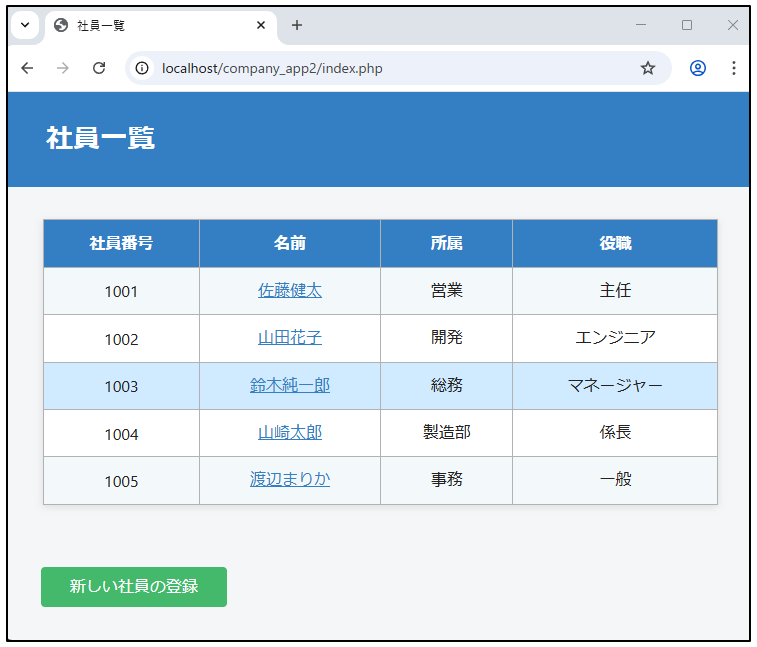
4.社員情報管理アプリの実行
ブラウザを起動して以下のURLを入力します。
http://localhost/company_app2/index.php実行画面
まとめ
- 外部CSS(css/style.css)でデザインを一元管理でき、拡張も簡単です。
- HTMLの
<head>に<link rel="stylesheet" href="css/style.css">を必ず入れてください。 - ディレクトリ構成を参考にファイルを整理すると、メンテナンスもしやすくなります。
レイアウト・色・装飾の変更は style.css を編集すれば即反映されます。
より美しいアプリを目指して、CSSをカスタマイズしてみましょう!